
Dealing with weird spam or negative comments on your Instagram posts? Or maybe you just commented on a friend’s post and left an embarrassing typo. Whether you want to clean up your profile’s engagements or improve your digital privacy, moderating and occasionally deleting comments is just part of managing your Instagram presence. I’ve found that a quick cleanup now and then makes browsing my own posts more enjoyable, especially when I don’t have to see that one random bot comment about free gifts anymore.
How to Delete a Comment (Mobile)
You can delete comments with a few quick steps on either Android or iOs devices.
First, open the post with the comment you want to remove.
If you wrote it a while ago and can’t remember where, go to your profile and tap the three lines on the top right corner. Then tap Your Activity then Comments. Locate it here.
On Android, press and hold down on the comment text. On iPhone, you can swipe left on the comment instead.
Tap the Delete (trash can) icon.
Confirm deletion.
If you suddenly regret it, don’t worry: the confirmation banner usually has an undo option that stays for a few seconds. Keep in mind you have only a brief window to undo (just a matter of seconds), so act fast if you need to.
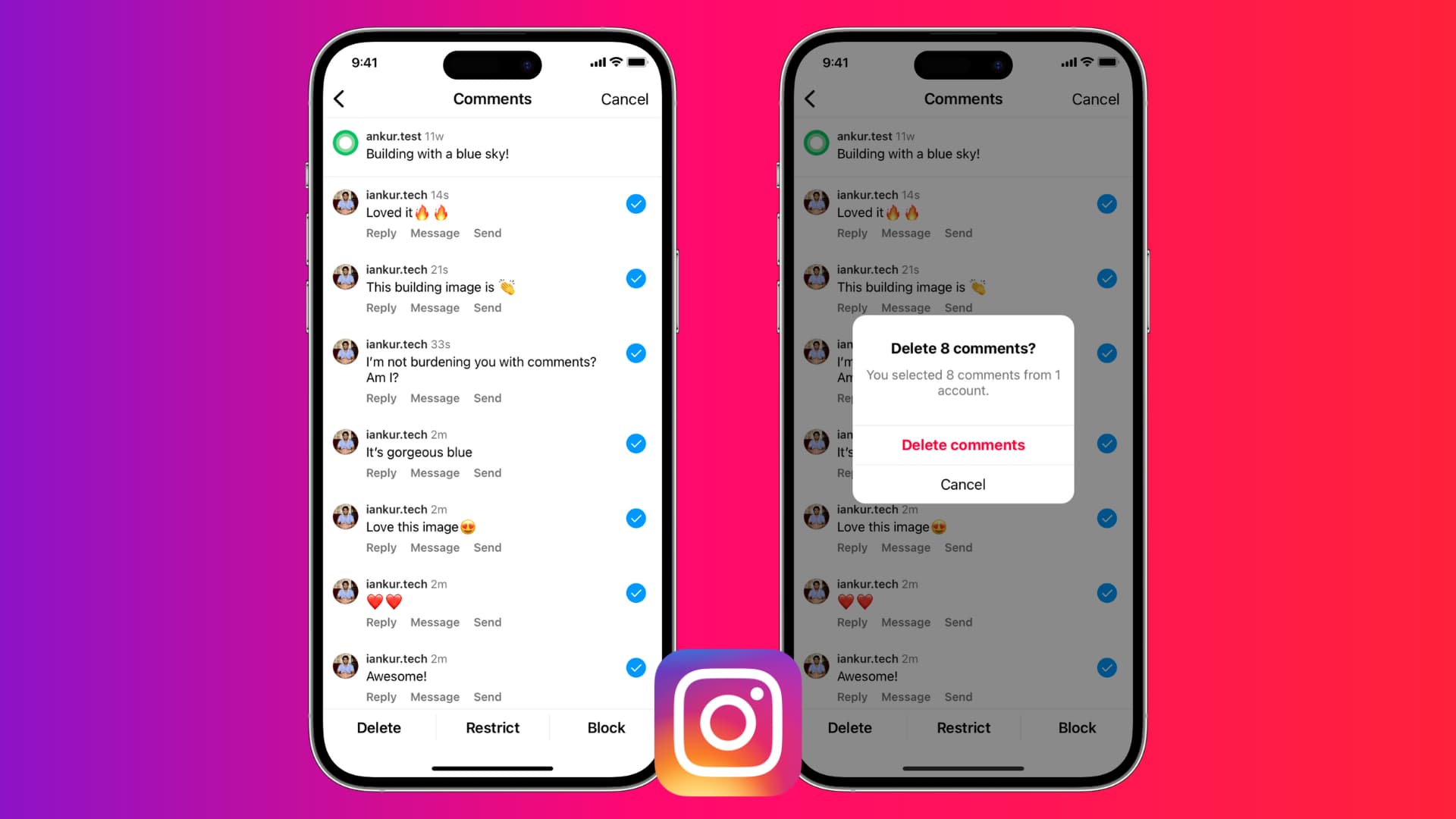
Need to delete multiple comments? If you have to remove several comments from a post, Instagram has a bulk-delete feature to make it easy (I’ll explain how it works in a bit in the section below.)
NOTE: On your own posts you can remove anyone’s comment, but on other people’s posts you can only remove your own comments.
How to Delete a Comment (Desktop)
Deleting a comment on the browser version of Instagram is straightforward regardless of whether you’re on a PC or Mac device.
Open the post and find the comment you want to delete.
Hover over the comment you want to remove to see the three dot menu to the right of the comment.
Click the three dots, then click Delete. You won’t get a popup confirmation the way you would on mobile, so tread with caution.
Deleting Multiple Comments at Once
A few years ago Instagram introduced a feature that lets you delete up to 25 comments at once, but it’s currently only available on the mobile app.
To bulk delete comments, first open the post you want to delete comments on.
Tap any comment on that post to select it.
Tap the three dot icon on the top right, then select Manage Comments.
Tap each comment you want to delete. You’ll notice checkmarks or highlights indicating they’re selected. You can select up to 25 comments in one go, but you can repeat this multiple times.
Tap Delete and confirm.
What Happens When You Delete a Comment?
So what happens when you delete a comment?
- The comment disappears for everyone. Once deleted, that comment is gone as if it never existed. Neither you nor other viewers (including the person who wrote it) will see it anymore.
- No notification is sent to the commenter. Instagram does not notify someone when you delete their comment.
- Likes and replies to the comment are removed too. If the comment had any likes or any threaded replies under it, those will disappear when the original comment is deleted.
- The number of comments on your post will change.
- You cannot undo it after a short time.
- If you delete your comment on someone else’s post, they will still see a notification that you commented but when they click it they won’t see your comment if you’ve already deleted it.
Tips for Managing Comments
Deleting comments is one way to address issues, but ideally you want to minimize how often you need to do that.
- Use Comment Filters: Instagram has a feature in Settings > Privacy > Comments that lets you filter out comments containing certain keywords. You can add words you find offensive or spammy. If someone tries to post a comment with those terms, Instagram will automatically hide it.
- Limit Who Can Comment: In that same Comments settings area, you can control who’s allowed to comment on your posts.
- Turn Off Commenting on a Post: If you have a particular post that’s drawing controversy or you just don’t want any comments on it, you can disable commenting for that post. To do this, tap the three-dot menu on the post and choose Turn Off Commenting. This will hide the comment section entirely for that post.
- Use the Restrict or Block Features: When one person continually leaves nasty comments, you have options beyond deleting each comment. You can block them (they won’t be able to see or comment on your stuff at all), or you can restrict them.
- Engage with the Good Comments: By actively engaging with positive comments (liking them, replying to them), you help create a kind atmosphere on your posts. New visitors are more likely to leave a nice comment if they see the comment section is a friendly place.
How To Get More Comments
Building a positive environment on your posts isn’t just about removing the bad, it’s also about encouraging the good. Respond to comments you appreciate, ask questions in your captions to invite genuine discussion, and make your followers feel heard.
Some people and businesses even go a step further to increase the interaction on their posts. For example, there are services out there that allow users to buy Instagram comments to increase the comment count artificially. Companies like QQTube offer packages where you pay to get a certain number of comments on your posts, helping your post look more popular.
FAQs
Q: Will the person know I deleted their comment?
No, Instagram doesn’t send a notification when a comment is deleted.
Q: Can I delete someone else’s comment on another person’s post?
No, you can only delete comments on posts that you own or you can delete your own comments that you left on others’ posts.
Q: I tried to delete a comment but it won’t go away – what’s happening?
If tapping Delete isn’t helping or you don’t see a delete option at all, double-check whose post it is. Remember, you cannot remove comments on someone else’s content if you didn’t write them.
Q: What if I accidentally delete a comment I didn’t mean to?
On mobile, you have a very short window to hit undo after deleting. If you missed that chance, unfortunately there’s no way to retrieve a deleted comment – you’d have to manually re-post the comment if it was something you wrote.
Q: Does deleting a comment also delete replies to that comment?
Yes, any direct replies threaded under that comment will be removed as well, since they’re attached to it.
Q: Are there any limits to how many comments I can delete?
There’s no hard daily limit for deleting comments one by one so you can remove as many as you need to, especially on your own posts. For bulk deletion, you can only remove 25 at a time, but you could repeat the process multiple times if you had more than 25 comments to delete.